 Skyport
Billing
Updated November 23, 2026
What it is for
Your account is prepaid: you add credit, then your resources use it up hour by hour. The Billing page shows your balance, what you use and your documents.
Add credit#
Mobile Money payment is coming soon (MTN MoMo and Orange Money). Until then, SkyEngPro adds the credit to your account for you.
- In the menu, choose Billing, then scroll down to Add credit.
- Note your customer reference, shown there: you quote it with your payment.
- Contact SkyEngPro from Account › Contact support, and give that reference.
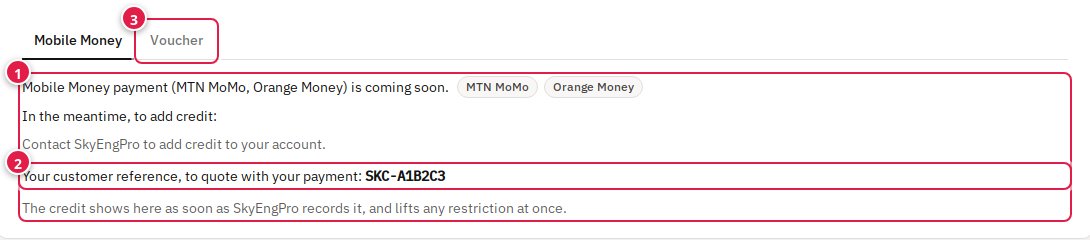
- Mobile Money: payment by Mobile Money is coming soon.
- Your customer reference: quote it when you contact SkyEngPro.
- The Voucher tab, for a voucher code (see below).
What you should see
The credit shows on your balance as soon as SkyEngPro records it, and lifts any restriction at once.
If something goes wrong
- The credit does not show although SkyEngPro confirmed it.
- Refresh the page. If it is still missing, contact us with the date, the amount and your customer reference.
Redeem a voucher#
- Under Add credit, Voucher tab.
- Enter the Voucher code (16 characters; dashes are optional), then Redeem voucher.
Understand your balance#
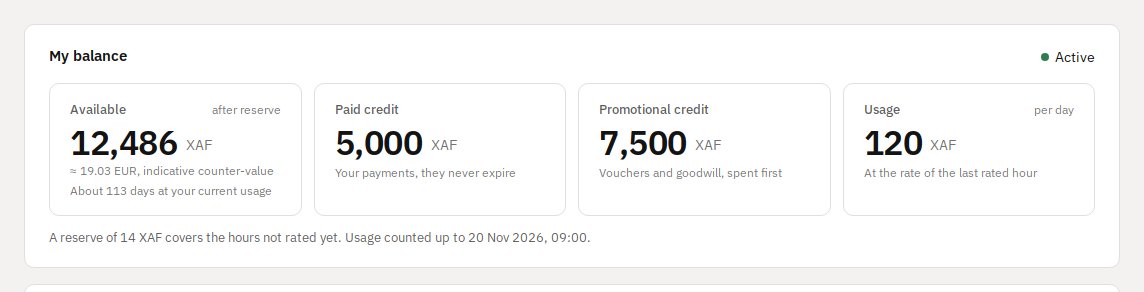
My balance is in CFA francs (XAF), with an indicative euro value. It separates:
- Paid credit: your payments, which do not expire;
- Promotional credit: vouchers and goodwill credit, used first.
Usage is calculated in CFA francs (XAF), excluding VAT, at launch prices, then taken from your balance.
What is billed#
| Resource | Billed… |
|---|---|
| Instance | for as long as it exists, even stopped |
| Volume (system disk included) | for as long as it exists, attached or not |
| Floating IP | for as long as it is reserved, attached or not |
To stop paying for a resource, delete it.
When the balance runs low#
- Low balance
- A Low balance banner says how long is left. Top up to avoid an interruption.
- Balance used up
- Your servers are stopped. After a top-up they do not restart on their own: the Restart stopped servers section lists them, with Start for each or Start all.
Movements and documents#
Movements lists every top-up and charge. Documents gathers your receipts, credit advices, invoices, credit notes and statements.
Only the owner and the people given billing access see this page.